Platform hub
BigQuery migration
Plan, convert, validate, and cut over with evidence—not guesswork.
Visual
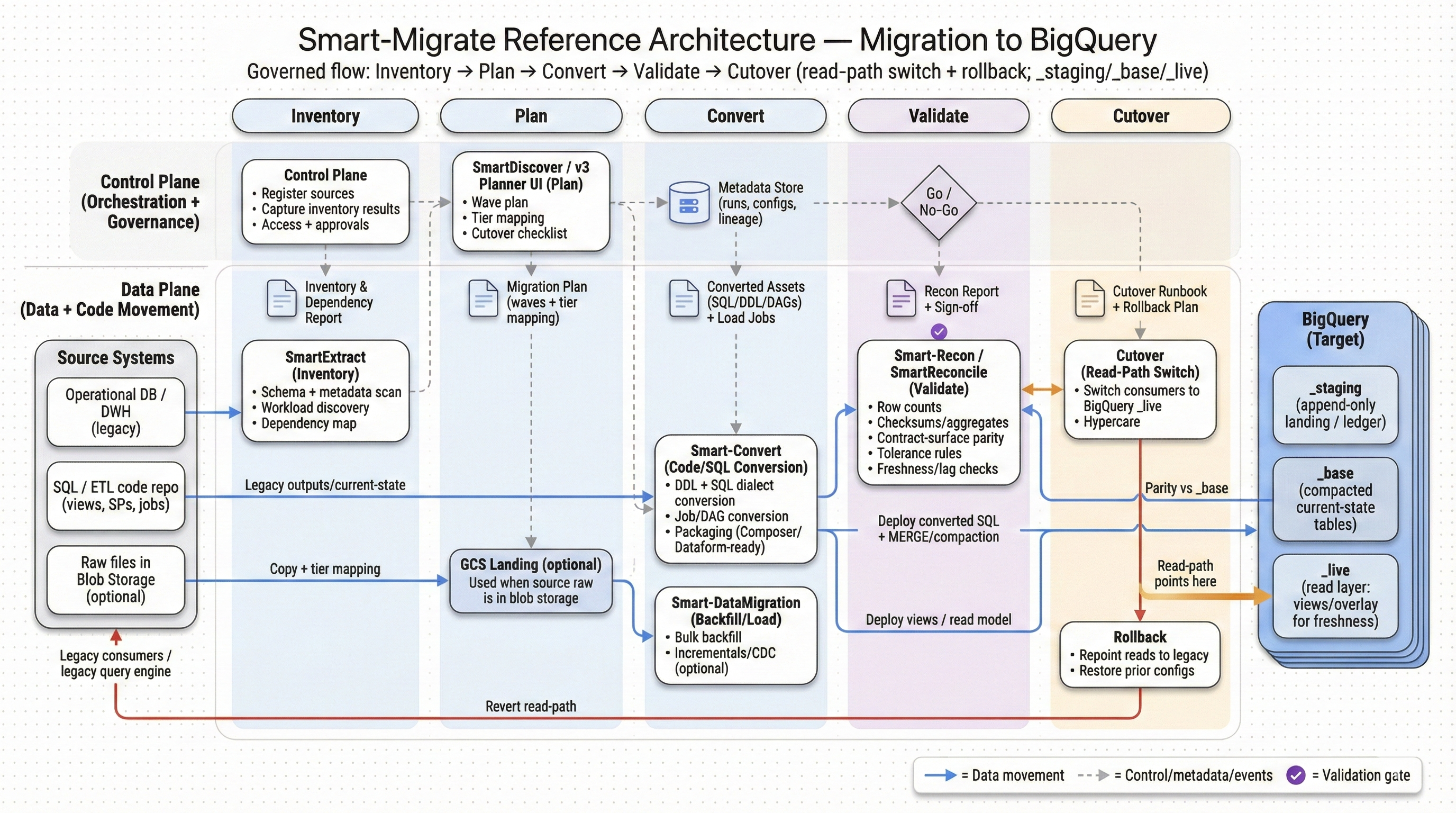
Reference architecture
BigQuery migrations succeed when conversion work is structured (what’s automated vs. what needs review) and cutover is gated by objective checks.
Overview
Why BigQuery migrations fail without conversion discipline
- BigQuery migrations rarely fail at data movement. They fail later—when converted queries behave differently, dashboards drift, or performance/cost surprises show up under real concurrency.
- A conversion-led approach keeps scope controlled: translate deterministic patterns automatically, flag semantic ambiguity early, and produce an exception list your team can resolve fast.
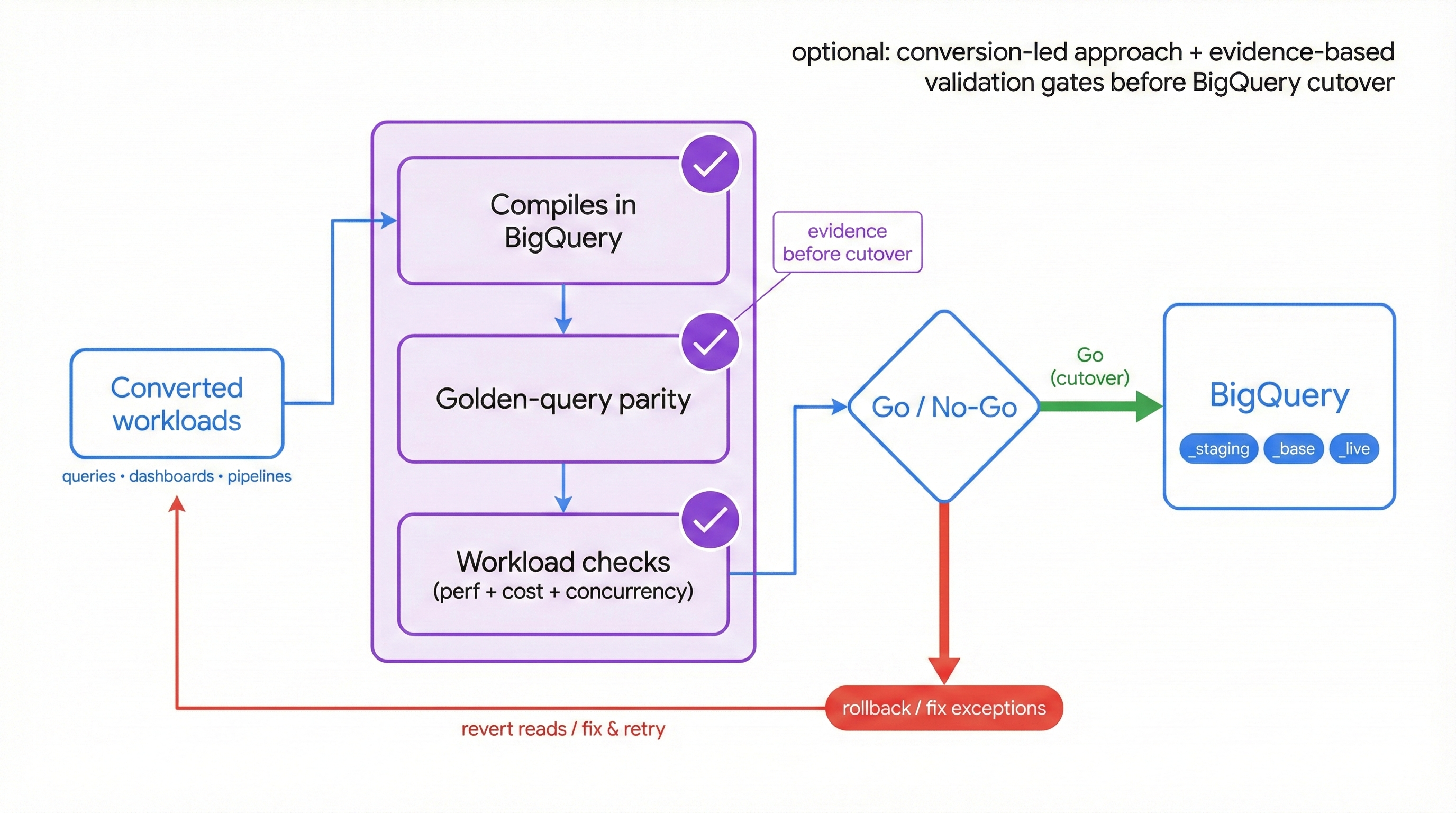
- Conversion work should always ship with evidence: compilation success, golden-query parity, and workload-specific checks that define what “correct” means before cutover.
Index
Migration pairs
Choose a source system to see the migration plan to this target.
- Impala → BigQuerySource pair
Move Impala workloads (Hive-compatible SQL, Parquet/ORC tables, partitioned datasets, and UDF-dependent queries) to BigQuery with predictable conversion and verified parity. We prioritize data type mapping, semantic correctness, and validation and reconciliation so cutover decisions are backed by evidence—not assumptions.
View → - Snowflake → BigQuerySource pair
Move Snowflake workloads (SQL, VARIANT/JSON, Streams/Tasks, stored procedures, masking policies, and BI semantics) to BigQuery with predictable conversion and verified parity. SmartMigrate makes semantic differences explicit, produces reconciliation evidence you can sign off on, and gates cutover with rollback-ready criteria—so you don’t discover “almost correct” in production
View → - Teradata → BigQuerySource pair
Move Teradata workloads (SQL/BTEQ scripts, macros, stored procedures, volatile tables, and WLM-shaped concurrency) to BigQuery with predictable conversion and verified parity. SmartMigrate makes semantic and performance differences explicit, produces reconciliation evidence you can sign off on, and gates cutover with rollback-ready criteria—so production outcomes are backed by proof, not optimism.
View → - Redshift → BigQuerySource pair
Move Redshift workloads (SQL, Spectrum/external tables, WLM-managed concurrency, stored procedures, and BI semantics) to BigQuery with predictable conversion and verified parity. SmartMigrate makes semantic and performance differences explicit, produces reconciliation evidence you can sign off on, and gates cutover with rollback-ready criteria—so production outcomes are backed by proof, not assumptions.
View → - Databricks → BigQuerySource pair
Explore migration scope, conversion approach, and validation plan.
View → - Hadoop (legacy clusters) → BigQuerySource pair
Explore migration scope, conversion approach, and validation plan.
View → - Hive → BigQuerySource pair
Explore migration scope, conversion approach, and validation plan.
View → - Netezza → BigQuerySource pair
Explore migration scope, conversion approach, and validation plan.
View → - Oracle → BigQuerySource pair
Move Oracle DW/OLAP workloads (schemas, PL/SQL, ETL jobs, and BI-dependent SQL) to BigQuery with predictable conversion and verified parity. SmartMigrate makes semantic and performance differences explicit, produces reconciliation evidence you can sign off on, and gates cutover with rollback-ready criteria—so production outcomes are backed by proof, not optimism
View → - Spark SQL → BigQuerySource pair
Explore migration scope, conversion approach, and validation plan.
View → - Vertica → BigQuerySource pair
Explore migration scope, conversion approach, and validation plan.
View →
No migration pairs match this filter.
What to watch
Migration challenges
- SQL dialect differences: functions, date/time behaviour, NULL handling, and window frames can change results subtly.
- Data type mapping: DECIMAL precision/scale and TIMESTAMP semantics often cause silent drift if not handled explicitly.
- Partitioning and performance: designs that worked in legacy warehouses don’t map 1:1; scan patterns can create cost regressions.
- UDF and procedural logic: custom functions rarely “lift and shift” and need a defined strategy per workload.
- Hidden BI coupling: dashboards and KPI queries depend on undocumented assumptions that must be discovered and tested.
Coverage
Workloads supported
Common workload areas we migrate and validate
Next step
Get a BigQuery migration plan you can execute
Inventory, conversion plan, validation strategy, and cutover criteria tailored to your SLAs—so your team knows exactly what will be automated, what needs review, and how sign‑off will be measured.